










































































































































































































































Changing your Steam username is one of the quickest ways to refresh your gaming identity — especially if you play titles like CS2, where having a clean, recognizable name matters just as much as your aim.
But before you jump in, there’s one important thing to understand: Steam has three different identifiers, and you can’t change all of them.
Steam Account Name vs. SteamID vs. Username (What You Can Actually Change)
Steam has three types of names:
- Account Name (Login Name) → Permanent. You cannot change this under any circumstances.
- SteamID → Permanent numeric identifier. Also cannot be changed.
- Profile Name (Display Name / Steam Username) → This is the name that appears in games like CS2, on friend lists, and on your profile.
This is the name you can change anytime.
If you play a lot of competitive CS2, keeping your profile clean and updated is useful — especially if teammates want to find you after a good match or when sharing guides like how to change your CS2 crosshair or how to check your CS2 stats.
How to Change Your Steam Username (Desktop & Mobile)
Change Steam Username on Desktop (Steam Client or Browser)
- Open Steam and log into your account.
- Click your profile picture or username in the top-right.
- Select “View Profile.”
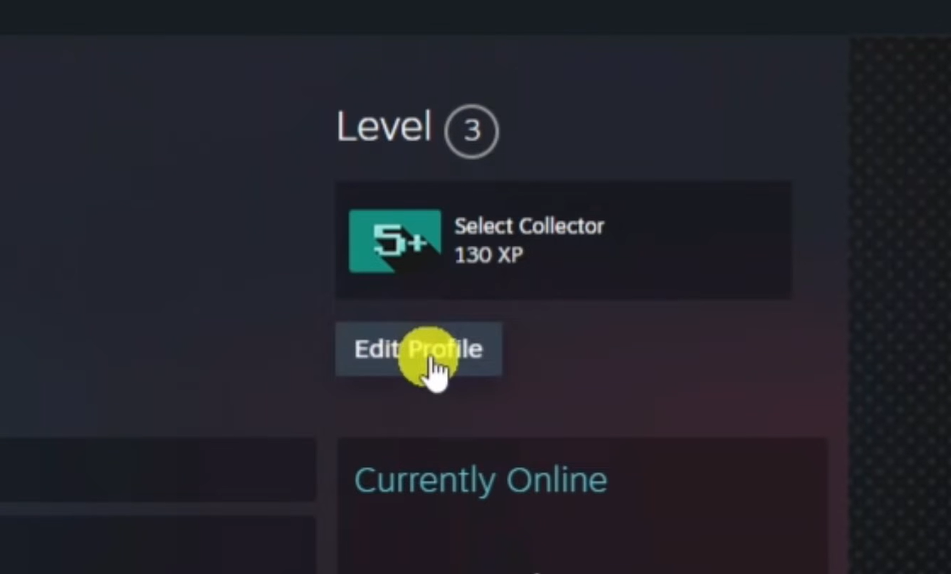
- Click “Edit Profile.”
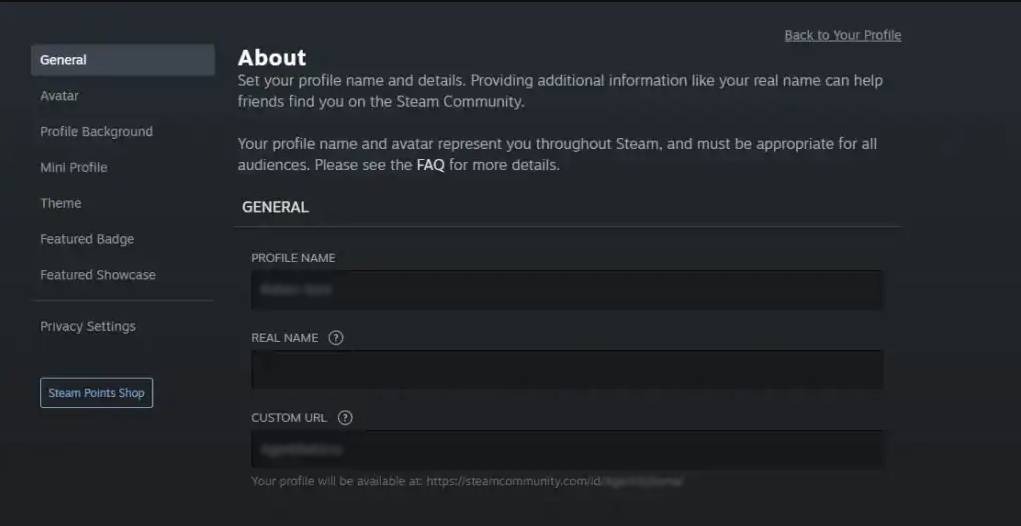
- Under General, find “Profile Name.”
- Enter your new username.
- Scroll down and click Save.
Your new name updates instantly across Steam and games like CS2.
Change Steam Username on Mobile (Steam App)
- Open the Steam app and sign in.
- Tap your profile icon → View Profile.
- Tap Edit Profile.
- Update your Profile Name.
- Tap Save at the bottom.
Perfect if you’re renaming yourself while waiting in long CS2 queue times.
What You Cannot Change on Steam
| Identifier | Can You Change It? | Notes |
| Login / Account Name | No | Permanent, used only for logging in. |
| SteamID | No | Unique account identifier. |
| Profile Name (Username) | Yes | Can be changed unlimited times. |
This is why many players simply update their public Steam name when rebranding for CS2 — for instance, when switching to a new setup inspired by pros like ZywOo’s CS2 settings or NiKo’s CS2 configs.
Why Gamers Change Their Steam Username
Changing your Steam display name makes sense when:
- You’re joining new lobbies or communities
- You’re rebranding your gaming identity
- You want a cleaner profile for trading cases (check Knife Cases in CS2)
- You’re removing personal info from your name
- You want your Steam name to match your in-game tag
- You’re updating your alias after grinding CS2 Premier
It’s also useful when playing custom content like CS2 custom maps or interacting with community servers.
Frequently Asked Questions (FAQs)
1. Can I change my Steam name whenever I want?
Yes — there is no limit. Change it as many times as you like.
2. Will changing my Steam name affect my CS2 profile?
No. Your rank, settings, inventory, and match history stay the same.
If you need help with CS2 ranking, see how to rank up in CS2.
3. Do my friends lose me if I change my name?
No. Your SteamID remains the same, so friends keep you on their list.
4. Does changing my name change my custom Steam URL?
No — the URL is separate. You can edit it in profile settings.
5. Can I change my Steam Account Name or SteamID?
No. Those are permanently locked to your account.
6. Is it safe to change my Steam username?
Yes. It has no negative effect on gameplay, VAC status, CS2 settings, or items.
If you also trade skins, you can review Steam trade holds.
Final Thoughts
- You can change your Steam profile/display name anytime.
- You cannot change your login Account Name or numeric SteamID.
- The change is instant and applies across all games, including CS2.
- This is useful when rebranding, improving privacy, or keeping your gaming identity consistent.


