Gaming on Steam is more than just fun, it’s a community, a marketplace, and for CS2 players, a hub for skins and in-game items. But where there’s value, scammers are never far behind. This guide dives into the most common Steam scams, how they operate, and practical tips to stay safe.
Why Steam Scammers Target Users
You might wonder, why would a scammer want a Steam card or your account?
Scammers target Steam for multiple reasons:
- Monetary gain: Steam Wallet balances and gift cards can be sold easily for real cash.
- Account hijacking: Stealing accounts with rare CS2 skins or items can fetch hundreds or thousands of dollars.
- Phishing & data collection: Scammers can harvest credentials for other platforms.
Common Types of Steam Scams
1. Steam Card Scams
How it works:
- A scammer asks for a Steam card “as proof” for a trade or deal.
- Once you share the code, it’s immediately redeemed, and you lose the money.
Red flags to watch for:
- “I’ll give you an item in return, trust me.”
- Urgent messages pressuring you to act fast.
- Requests from strangers on Discord or forums.

Tip: Never share your Steam card codes. Treat them like cash.
2. Trade Scams
These are the most common in CS2 and involve swapping items.
Examples:
- Overpay scam: A scammer offers a high-value item but tricks you into sending your item first.
- Fake trade window: Using manipulated screenshots or links to mimic Steam’s trade interface.
Pro Tip: Always double-check trades in the official Steam client, and enable Steam Guard Mobile Authenticator.
3. Phishing Links & Websites
Scammers often send links that mimic Steam’s login page.
Signs of phishing:
- URL doesn’t end in steampowered.com.
- Pop-ups asking for codes or login credentials.
- Messages on Discord or social media promising free CS2 skins.
Tip: Log in only through the official Steam client or verified site.
4. Steam Scams on Discord
Discord is a hotspot for scammers targeting gamers.
How it happens:
- Users are approached with “exclusive CS2 skin deals.”
- Scammers impersonate verified traders or influencers.
- Often accompanied by urgency: “Offer expires in 5 mins!”
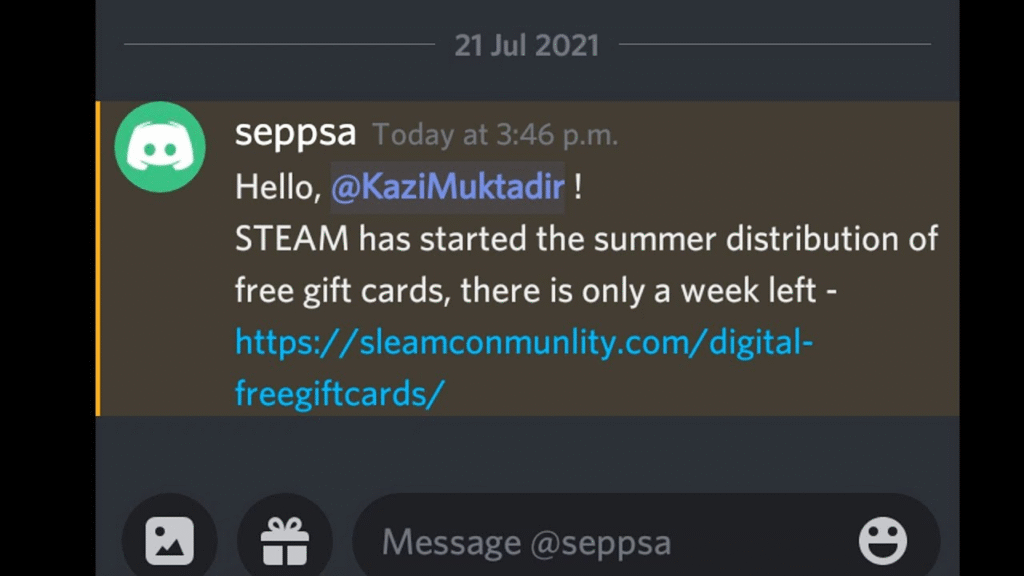
Tip: Never trade outside Steam’s official trade system. You can also refer to guides on safe CS2 trading practices for added protection.
5. Giveaway & Free Item Scams
Scammers promise free CS2 skins, Steam Wallet credit, or rare items.
Red flags:
- Requires you to enter your Steam login.
- Must share personal information or redeem codes.
- Offers that seem “too good to be true.”
Tip: Genuine giveaways don’t ask for passwords or codes. Always verify the source.
How to Protect Yourself from Steam Scams
| Security Measure | Why It Helps |
| Enable Steam Guard | Adds a second layer of authentication to prevent unauthorized access |
| Verify trade links | Prevents fake trade scams |
| Check URLs carefully | Protects against phishing attempts |
| Avoid trading outside Steam | Keeps transactions secure and reversible |
| Use trusted community sources | Reduces exposure to Discord and forum scams |
For CS2 players, enabling security measures can protect your skins and items, which can be as valuable as real money. For example, you can check trade safety with guides like how to check someone’s Steam trade history.
Recognizing a Scam Before You Act
- Look for poor grammar or pressure tactics.
- Verify the identity of anyone asking for items or codes.
- If something feels off, pause and consult community resources or guides.
Final Thoughts
Scammers thrive on urgency and trust. By staying cautious, using Steam Guard, and relying on official channels for trades and purchases, you can enjoy Steam and CS2 without losing your account or items.For more CS2 security tips, consider checking guides on CS2 skins trading and account safety. You might also find CS2 player settings guides useful to maintain a secure account while optimizing gameplay.