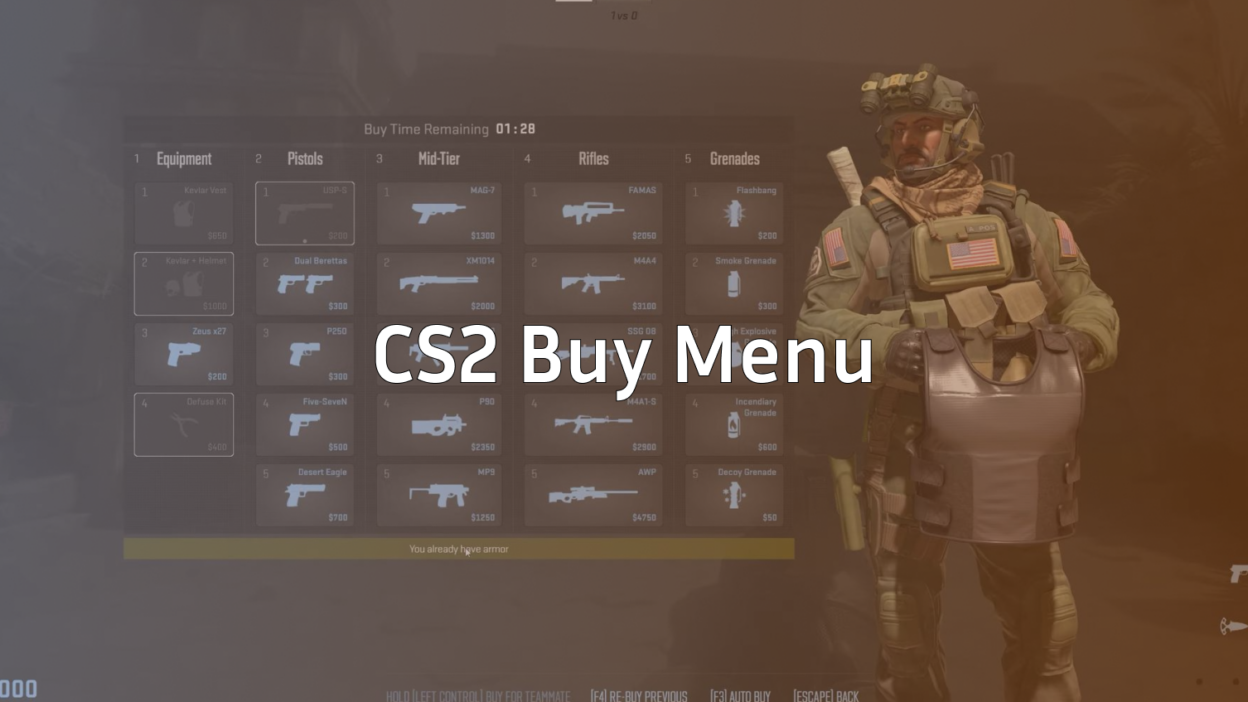
The cs2 buy menu is your gateway to victory in Counter-Strike 2. Whether you’re clutching with a Deagle or spraying down enemies with an AK-47, understanding how to efficiently navigate and optimize your purchases can be the difference between winning and losing rounds.
In this comprehensive guide, you’ll learn everything about the CS2 buy menu system, from basic navigation to advanced economy management strategies that pros use to dominate their matches.
Understanding the CS2 Buy Menu Basics
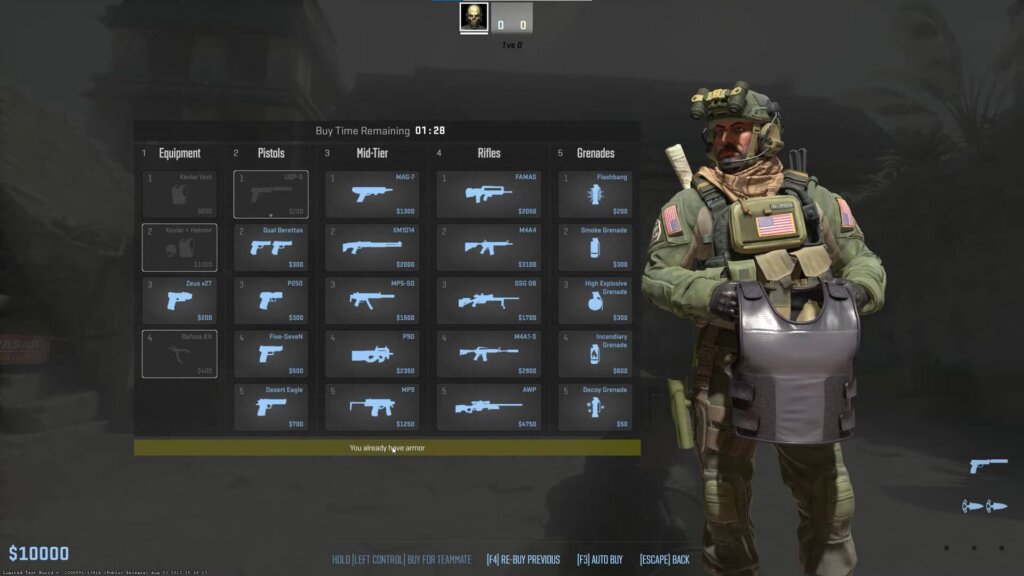
The CS2 buy menu is your primary interface for purchasing weapons, equipment, and utility during the buy phase at the start of each round. Unlike the old CSGO system, CS2 has streamlined the buying process while maintaining the tactical depth that makes Counter-Strike legendary.
How to Open the Buy Menu
You can access the buy menu through several methods:
- Default Key: Press
Bto open the buy menu - Mouse: Right-click during the buy phase
- Console Command: Type
buyin the console
The buy phase lasts 15 seconds at the beginning of each round, giving you limited time to make purchasing decisions. After this window closes, you can only buy within the designated buy zones near your spawn.
Buy Menu Categories
The CS2 buy menu is organized into logical categories that make weapon selection intuitive:
Pistols Section
- Starting pistols (Glock-18 for Terrorists, USP-S/P2000 for Counter-Terrorists)
- Upgrade options like Desert Eagle, Five-SeveN, and Tec-9
Heavy Weapons
SMGs
Rifles
Equipment & Utility
- Armor (Kevlar and Helmet)
- Grenades (HE, Flash, Smoke, Incendiary/Molotov)
- Defuse kits (CT only)
CS2 Economy System Explained
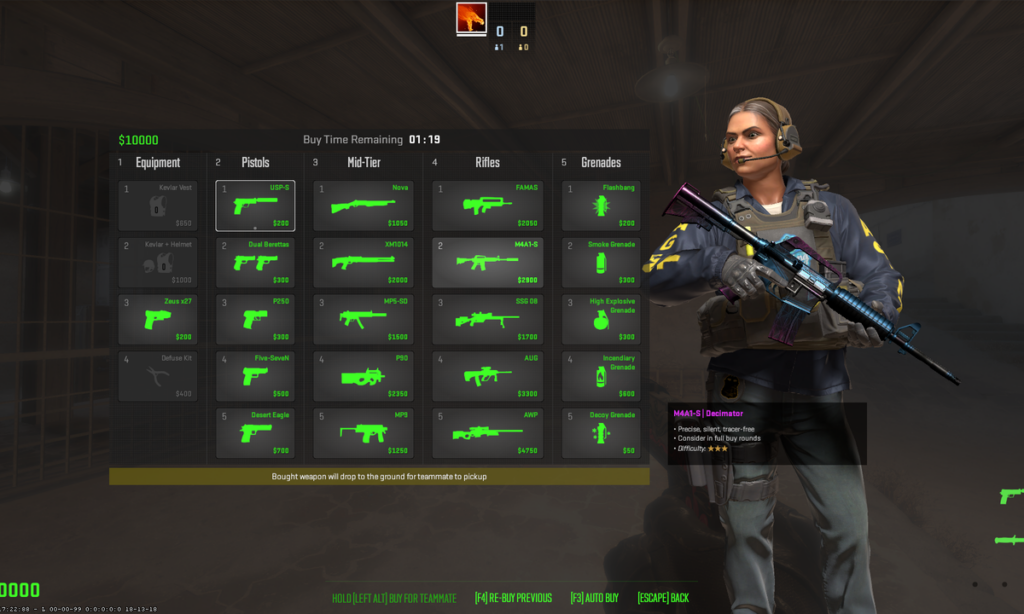
Understanding the CS2 economy is crucial for making smart buying decisions. The economy system determines how much money you earn and spend, directly impacting your team’s ability to buy competitive weapons.
Money Sources
Round Win Bonuses
- Bomb defuse: $3,250
- Bomb explosion: $3,500
- Elimination victory: $3,250
- Time expiration (CT win): $3,250
Kill Rewards
Different weapons provide varying kill rewards:
| Weapon Type | Kill Reward |
| Knife | $1,500 |
| Pistols | $300 |
| SMGs | $600 |
| Shotguns | $900 |
| Rifles | $300 |
| AWP | $100 |
| Zeus | $300 |
Loss Bonus
Teams receive increasing money for consecutive round losses:
- 1st loss: $1,400
- 2nd loss: $1,900
- 3rd loss: $2,400
- 4th loss: $2,900
- 5th+ loss: $3,400
Key Weapon Prices
Understanding weapon costs helps you make quick buying decisions:
Essential Rifles
Force-Buy Options
- Desert Eagle: $700
- Five-SeveN: $500
- Tec-9: $500
- P250: $300
Armor & Utility
- Kevlar + Helmet: $1,000
- Kevlar only: $650
- HE Grenade: $300
- Flashbang: $200
- Smoke Grenade: $300
- Defuse Kit: $400
Buy Menu Navigation Tips
Efficient navigation of the cs2 buy menu can save precious seconds during the buy phase, allowing you more time for strategy discussion and positioning.
Quick Buy Techniques
Number Key Shortcuts
Each category corresponds to number keys:
1– Pistols2– Heavy weapons3– SMGs4– Rifles5– Equipment
Mouse Wheel Navigation
Use your mouse wheel to quickly scroll through weapon options within each category. This method is particularly useful when you know exactly what weapon class you want.
Custom Buy Binds
Advanced players often create custom buy binds for instant purchases:
bind "f1" "buy ak47; buy m4a1"bind “f2” “buy awp”
bind “f3” “buy vesthelm”
bind “f4” “buy smokegrenade”
These binds allow you to purchase specific weapons instantly without navigating through menus.
Economy Management Strategies
Smart economy management separates good players from great ones. Here are proven strategies used by professional teams:
Full Buy vs Eco Rounds
Full Buy Characteristics
- Team has $4,000+ per player
- Purchase rifles, armor, and full utility
- Maximum firepower for important rounds
Eco Round Strategy
- Minimal spending (under $1,000 per player)
- Focus on stacking money for future rounds
- Use starting pistols and limited utility
Force Buy Situations
- Spend remaining money when you must win the round
- Common in crucial rounds like round 30 in overtime
- High-risk, high-reward strategy
Team Economy Coordination
Drop System
Coordinate weapon drops with teammates:
- Players with excess money buy for teammates
- Prioritize key fraggers and AWPers
- Share utility based on planned strategies
Save vs Force Decisions
Consider these factors when deciding to save or force:
- Current round importance
- Enemy team’s economy
- Map position advantages
- Time remaining in the half
Advanced Buy Menu Features
CS2 introduces several quality-of-life improvements to the buying experience that enhance the tactical depth of economic decisions.
Auto-Buy Functionality
The auto-buy feature automatically purchases a preset loadout based on your available money:
bind "f5" "autobuy"You can customize your auto-buy preferences through:
- Game settings menu
- Console commands
- Config file modifications
Weapon Switching
CS2 allows you to switch between certain weapon variants:
Access this feature through the inventory menu outside of matches.
Common Buy Menu Mistakes
Avoid these frequent errors that can cost you rounds:
Overspending on Unnecessary Items
Mistake: Buying expensive weapons when eco rounds are more appropriate
Solution: Always consider your team’s overall economy before making purchases
Mistake: Purchasing multiple flashbangs when smokes would be more valuable
Solution: Coordinate utility purchases with your team’s strategy
Poor Timing
Mistake: Taking too long to make buying decisions
Solution: Plan your purchases during the previous round’s end
Mistake: Forgetting to buy during the buy phase
Solution: Develop muscle memory for essential purchases
Lack of Team Coordination
Mistake: Everyone buying the same utility
Solution: Communicate purchases to ensure balanced team loadouts
Mistake: Not dropping weapons for teammates who need them
Solution: Monitor teammate economies and offer drops when possible
Pro Player Buy Menu Strategies
Professional players employ sophisticated buying strategies that maximize their team’s competitive advantage.
Anti-Eco Setups
When facing an enemy eco round:
- Purchase SMGs for higher kill rewards
- Invest in armor to survive pistol damage
- Avoid expensive rifles that provide minimal advantage
Force-Buy Counters
Against enemy force-buys:
- Maintain distance to leverage rifle advantages
- Use utility to control engagements
- Play for picks rather than aggressive pushes
Economy Reading
Top players analyze enemy purchases to predict their economy:
- Track enemy round losses for loss bonus calculations
- Observe weapon types to estimate remaining funds
- Predict future enemy buying patterns
CS2 Buy Menu Console Commands
Master these console commands for advanced buy menu control:
Essential Buy Commands
buy ak47 // Purchase AK-47buy m4a1 // Purchase M4A1-S
buy awp // Purchase AWP
buy vesthelm // Purchase armor and helmet
buy vest // Purchase armor only
buy defuser // Purchase defuse kit
buy smokegrenade // Purchase smoke grenade
buy flashbang // Purchase flashbang
buy hegrenade // Purchase HE grenade
Advanced Commands
buy_random // Purchase random weapon from categorybuyequip // Purchase equipment only
buymenu // Force open buy menu
Money Management Commands
mp_startmoney 16000 // Set starting money (server)mp_maxmoney 65535 // Set maximum money (server)
impulse 101 // Give maximum money (cheat)
Optimizing Your Loadout
Creating the perfect loadout requires understanding weapon roles and map-specific requirements.
Rifle Round Loadouts
Standard T-Side Setup
- Primary: AK-47 ($2,700)
- Armor: Kevlar + Helmet ($1,000)
- Utility: Smoke + Flash ($500)
- Total: $4,200
Standard CT-Side Setup
- Primary: M4A4 ($3,100)
- Armor: Kevlar + Helmet ($1,000)
- Utility: Smoke + Kit ($700)
- Total: $4,800
AWP Setups
AWP + Support
- Primary: AWP ($4,750)
- Secondary: Upgraded pistol ($500-700)
- Armor: Kevlar + Helmet ($1,000)
- Total: $6,250-6,450
Force-Buy Loadouts
Aggressive Force
- Primary: P250 ($300)
- Armor: Kevlar + Helmet ($1,000)
- Utility: Flash + HE ($500)
- Total: $1,800
Map-Specific Buying Considerations
Different maps require adapted buying strategies based on their unique characteristics.
Close-Range Maps
On maps like Mirage and Inferno:
- SMGs become more viable
- Shotguns can be situationally effective
- Close-range pistols like CZ75-Auto excel
Long-Range Maps
Maps such as Dust 2 favor:
- AWP purchases for long angles
- Scoped rifles for medium-long engagements
- Precise rifles over spray-friendly weapons
Utility-Heavy Maps
Complex maps like Nuke require:
- Increased smoke grenade purchases
- Molotov/Incendiary for area denial
- Flashbangs for coordinated executes
Troubleshooting Buy Menu Issues
Common technical problems and their solutions:
Buy Menu Not Opening
Problem: Buy menu doesn’t respond to key presses
Solutions:
- Verify you’re in the buy zone
- Check if buy time has expired
- Restart CS2 client
- Verify key bindings in settings
Purchase Commands Not Working
Problem: Console buy commands fail
Solutions:
- Ensure correct spelling and syntax
- Verify sufficient funds
- Check if weapon is available for your team
- Confirm you’re in a valid buying location
Auto-Buy Malfunctioning
Problem: Auto-buy purchases wrong items
Solutions:
- Reset auto-buy preferences
- Manually configure preferred weapons
- Clear config file and reconfigure
Advanced Economy Tactics
Calculated Losses
Sometimes losing a round strategically benefits your long-term economy:
- Save rounds: Preserve weapons for stronger future rounds
- Exit fragging: Secure kills while losing to maintain economy
- Utility denial: Prevent enemies from collecting your equipment
Economic Warfare
Disrupt enemy economy through:
- Force-buy timing: Force enemies into unfavorable economic situations
- Equipment denial: Prevent enemies from saving valuable weapons
- Kill reward maximization: Use high-reward weapons against eco rounds
Team Communication for Buying
Effective communication during buy phases maximizes team coordination:
Essential Callouts
- “Full buy”: Everyone purchases complete loadouts
- “Eco”: Save money, minimal purchases
- “Force”: Spend remaining money strategically
- “Drop me”: Request weapon from teammate
Economic Information Sharing
Share these details with teammates:
- Current money amount
- Planned purchases
- Available drops
- Utility coordination needs
Future-Proofing Your Buy Menu Skills
Stay ahead of meta changes and updates:
Following Professional Scenes
Monitor professional matches to observe:
- Evolving buy strategies
- New utility usage patterns
- Economic meta shifts
- Weapon preference changes
Adapting to Updates
CS2 regularly receives balance updates affecting:
- Weapon prices
- Economy mechanics
- Utility effectiveness
- Map-specific considerations
Conclusion
Mastering the cs2 buy menu is essential for competitive success in Counter-Strike 2. From understanding basic navigation to implementing advanced economic strategies, every purchasing decision impacts your team’s performance.
Remember these key principles:
- Economy management determines long-term success
- Team coordination maximizes buying efficiency
- Situational awareness guides smart purchase decisions
- Practice builds muscle memory for quick buying
Ready to improve your CS2 skills beyond just buying? Check out our comprehensive guides on CS2 practice commands and explore the latest CS2 skins to enhance your gaming experience.
Start implementing these buy menu strategies in your next match, and watch your team’s economic game reach professional levels!